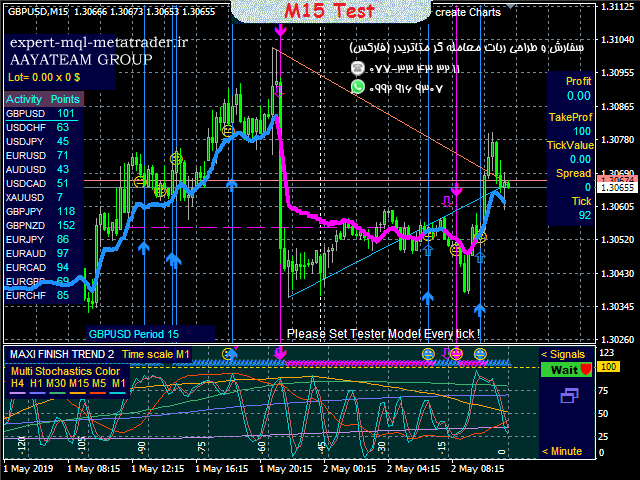
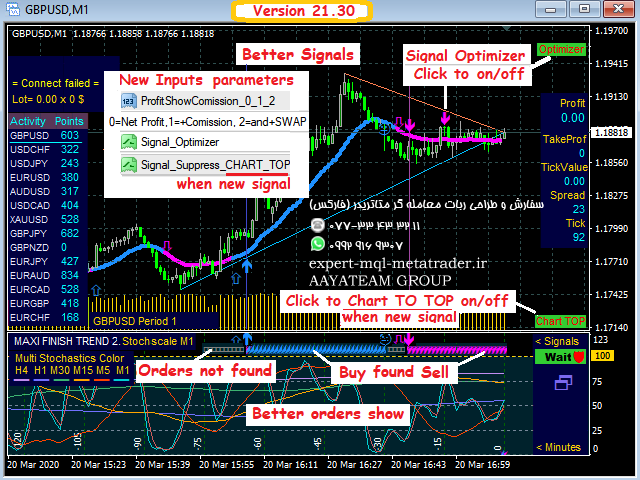
MaxiFinishTrend 2
(قیمت امروز/2).
همه سیگنال ها سیستم تجارت هوشمند
شاخص های محبوب دو سیگنال میدهند – خرید و فروش ، و شما باید Take Profit را انتخاب کرده و قرار دهید. معمولاً به سرعت کار میکند و روند به نفع شما پیش میرود ، اما شاخص تا زمان تغییر روند “ساکت” است. بیشتر سود را از دست میدهید.
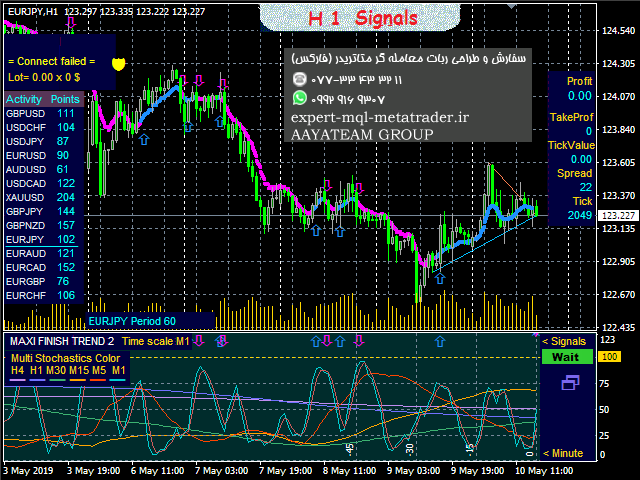
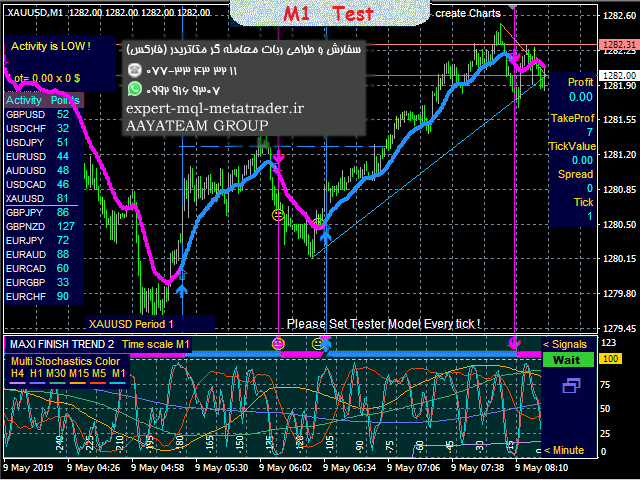
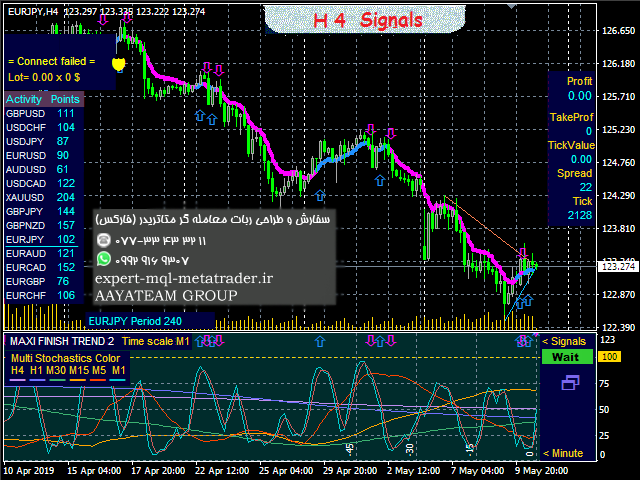
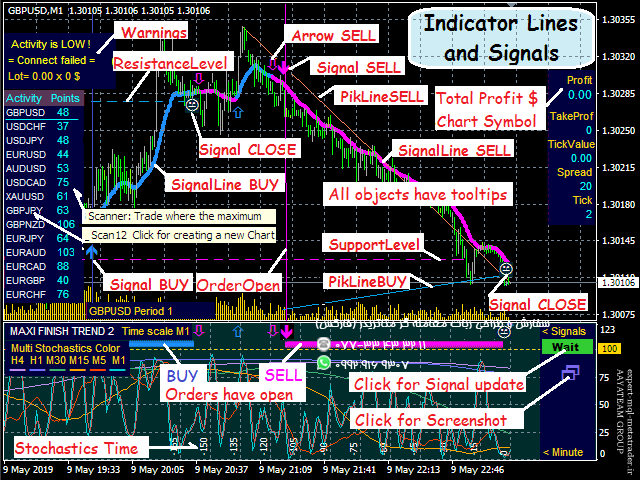
اولین ایده MaxiFinish: سیگنال سوم را بدهید – GET PROFIT (CLOSE) هنگامی که خط روند شیب را تغییر میدهد یا stochastics M15 و M30 به حد افراطی میرسند و سود شروع به کاهش میکند. اگر در یک سیگنال ، سفارشی را بسته اید ، نشانگر سریع سیگنال جدیدی را در همان جهت – هنگامی که روند ادامه مییابد ، یا در جهت مخالف – هنگامی که روند تغییر میکند ، میدهد. چنین تاکتیک هایی به طور قابل توجهی نتیجه را افزایش میدهند – شما در بالاترین سطح سود میگیرید و سیگنال های بیشتری دارید.
ایده دوم MaxiFinish این است که از یک اسکنر جمع و جور برای بررسی بازار و انتخاب محل تجارت و نشان دادن مکان فعلی بازار استفاده کند. برای نمادهای مورد علاقه شما ، با یک کلیک روی اسکنر نمودارهای آنها را با نصب خودکار نشانگر و الگو ایجاد میکنید. سیگنال های معاملاتی که از تمام نمودارهای ایجاد شده دریافت میکنید. اسکنر ترمینال را با یک سیگنال جدید به نمودار تغییر میدهد (CHART TOP = true).
ویژگی سوم: دو سیگنال دیگر وجود دارد: هنگامی که Take Profit یا Stop Loss کار کرد.
چهارمین ویژگی: این شاخص چند دوره ای – در هر دوره ای خطوط تصادفی را در بازه های زمانی بالاتر و پایین نشان میدهد – “از طریق بازه های زمانی” را مشاهده میکنید.
سیگنال ها روی نمودار و پیام ها ارائه میشوند: صدا به زبان انگلیسی ، به ایمیل و MQID به تلفن همراه.
معاملات ساده است – سفارشات را بر اساس سیگنال ها باز و بسته کنید.
نشانگر بدون رنگ آمیزی مجدد
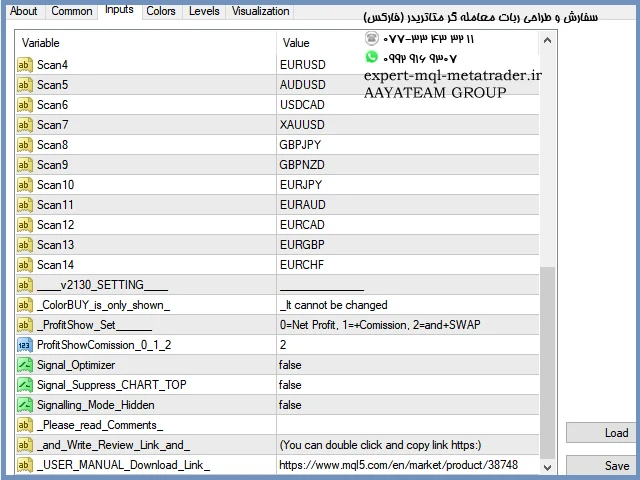
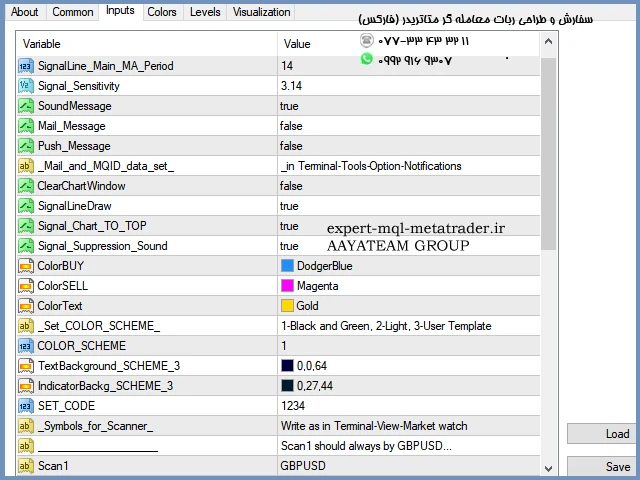
تنظیمات ورودی:
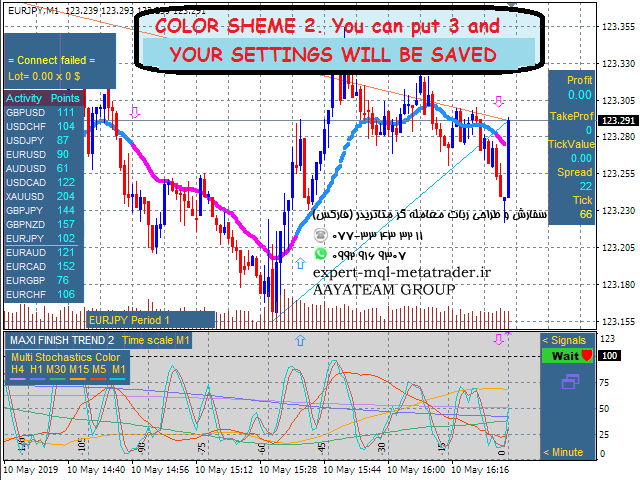
اکثر نام ها قابل درک هستند – آنچه را که میخواهید روشن یا خاموش کنید قرار دهید. در صورت تمایل به تغییر رنگها COLOR_SCHEME = 3 را تنظیم کنید.
SignalLine_Main_MA_Period – برای تنظیم دقیق دوره اصلی خط سیگنال. ورودی = 26 یا 52 یا 104 یا موارد دیگر را وارد کنید و بعد از Init به نمودار توجه کنید که سیگنال ها از چه مقدار دقیق تر هستند ، بنابراین مبادله کنید.
حساسیت سیگنال – برای تنظیم دقیق حساسیت نشانگر. مقادیر م areثر چند برابر PI = 3.14 است ، به عنوان مثال 1.57 یا 6.28 و موارد مشابه. این تنظیم سیگنال دهی دیر یا زود است.
همیشه میتوانید تنظیم کنید که هر چند وقت یکبار میخواهید سیگنال دریافت کنید.
کنترل و حفاظت:
در صورت خطاهای داده در نقل قول ها ، پیام را دریافت کنید ، به عنوان مثال ، “داده H4 یافت نشد!”.
اگر پارامترهای نادرست را وارد میکنید ، پیام “خطای ورودی داده. لطفاً ویرایش کنید …” را دریافت کنید.
کنترل سیگنالها – اگر “بوق” (سیگنال سرکوب صدا = درست) میشنوید – مطابق رنگ SignalLine خرید یا فروش کنید. حتی در M1 نیز میتوانید با اطمینان معامله کنید.
وقتی برنامه نشانگر قفل است ، نماد روی دکمه [سیگنال] چشمک نمیزند.
اگر نشانگر از سایت mql5.com یا MetaTrader دریافت شود ، سیگنال ها درست خواهند بود.
نصیحت مفید:
اگر مطمئن نیستید برای وارد شدن عجله نکنید – روی دکمه [Signal] کلیک کنید تا منتظر بعدی باشید. در جایی که فعالیت و ارزش تیک بیشتر و کمتر پخش میشود معامله کنید.
با دریافت سیگنال SELL سفارش BUY را ببندید و بالعکس.
وقتی سود خوب کاهش مییابد – بدون سیگنال بسته میشود. این نشانگر “میداند” چه چیزی را بسته اید و سریع سیگنال جدیدی میدهد.
اگر میخواهید کامپیوتر را خاموش کنید ، “Recommended Take سود” و Stop Loss> 280 Points (28 برای 4 رقم MT) را قرار دهید.
برای موفقیت بیشتر [نظرات] را مطالعه کنید.
بارگیری رایگان “USER MANUAL.PDF .EN”.
همیشه جدیدترین اطلاعات در وب سایت MQL5 وجود دارد.
این نشانگر در 4 و 5 رقم MT4 ، در هر مانیتور Screen DPI ، در تمام دوره ها و نمادهای فارکس کار میکند.
ویدئو تست m1 را در زیر مشاهده کنید ، آزمایش m15 و h1 (روی نماد روی فیلم کلیک کنید).
هشدارها:
1. “نسخه آزمایشی” دارای قابلیت محدود بدون هیچ تستر. لطفاً قبل از اولین آزمایش ، روی [ویژگی های شاخص] کلیک کنید ، و در آنجا [Reset] ، سپس علامت اسکن خود را دقیقاً مانند “Market Watch” بررسی کنید و بنویسید ، برای مثال GBPUSD.fft. بسیاری از ویژگی ها در تستر کار نمیکنند ، اما آزمایش ها واقعی هستند.
آزمایشی آزمایشی رایگان و مقایسه میزان دقیق تر (و سریعتر) این شاخص نسبت به سایرین. بررسی کنید که چگونه میتوان فرکانس سیگنال مورد نظر را روی هر نمودار تنظیم کرد.
2. فقط از وب سایت mql5.com خرید کنید و بلافاصله با خیال راحت از نویسنده “دستورالعمل ها و نکات بهترین استفاده” محرمانه بپرسید.
اسکرین شات های خود را به پیام مشکل وصل کنید تا بتوانم سریعتر به شما کمک کنم.
(Today price/2).
All signals. Smart trading system.
Popular indicators give two signals – BUY and SELL, and you have to choose and put Take Profit. Usually it works quickly and the trend goes in your favor, but the indicator is “silent” until the trend change. You miss most of the profit.
The first idea of MaxiFinish : give a third signal – GET PROFIT (CLOSE) when the trend line changes the slope or the M15 and M30 stochastics have reached an extremum and the profit began to decline. If, on a signal, you have closed an order, the indicator fast give a new signal in the same direction – when the trend continues, or in the opposite direction – when the trend changes. Such tactics significantly increase the result – you take profit at the highs and have more signals.
The second idea of MaxiFinish is to use a compact scanner to review the market and choose where to trade and showing where the market is now active. For the Symbols you are interested in, with one click on the scanner you create their charts with automatic installation of the indicator and Template. Trading signals you receive from all created charts. The scanner automatically switches the Terminal to a chart with a new signal (CHART TO TOP = true).
The third feature : there are two more signals: when Take Profit or Stop Loss worked.
The fourth feature : this indicator Multi-Periods – it shows on any period the lines of stochastics higher and lower timeframes – you see “through timeframes”.
Signals are given on chart and messages : sound in English , to email and MQID to mobile.
Trading is simple – open and close orders based on signals.
Indicator no repaint.
Input Settings:
-
- Most of the names are understandable – put what you want to turn on or off. If you wish to change the colors set COLOR_SCHEME = 3.
-
- SignalLine_Main_MA_Period – for fine tuning of the main period of the Signal Line. Put in Input = 26 or 52 or 104 or other and look at the chart after Init for what value the signals are more accurate, so trade.
-
- Signal_Sensitivity – to fine tune the indicator sensitivity. Effective values are multiples of PI = 3.14, for example 1.57 or 6.28 and the like. This is the setting to signalling sooner or later.
You can always tune , how often you want to receive signals.
Control and protection:
-
- In case of data errors in the quotes, get the message, for example, “Data H4 not found!”.
-
- If you enter incorrect parameters, get the message “Data Input error. Please Edit …”.
- Control of signals – if you hear “beep” (Signal Suppression Sound = true) – make BUY or SELL according to the SignalLine color. You can trade confidently even on M1.
- When the indicator programm is locked, the icon on the [Signal] button will stop flashing.
Signals will be correct if the indicator is received from the site mql5.com or MetaTrader.
Good advice:
-
- Do not rush to enter if you are not sure – click [Signal] button to wait for the next one. Trade where more Activity and Tick Value and less Spread.
- Close the BUY order, having received the SELL signal, and vice versa.
-
- When good profit decreases – close without signals. This indicator “knows” what you have closed and fast give a new signal.
- Put “Recommended Take profit” and Stop Loss > 280 Points (28 for 4 digits MT), if you are going to turn off the computer.
For maximum success study the [Comments].
Free download “USER MANUAL.PDF .EN“.
The newest information is always on the MQL5 website.
The indicator works on 4 and 5 digits MT4, at any Screen DPI monitors, on all Periods and Symbols Forex.
See video-test m1 below, tests m15 and h1 (click avatar on video).
Warnings:
1. The “Demo version” has limited functionality by no Multi Tester. Please click [Indicator properties] before first Test, and there [Reset], then check and write exactly as in your “Market Watch” your Scan Symbol, for example GBPUSD.fft. Many features don’t work in the Tester, but the tests are real.
Free Test Demo and compare how more accurate signals (and faster) this indicator gives than others. Check how easy it is to set up the desired signal frequency on any chart.
2. Buy only on the mql5.com website and immediately feel free to ask the author confidential “Instructions and Tips for Best Use”.
Attach your screenshots to the problem message, so that I can help faster.
تماس و واتس آپ اکسپرت سفارشی: ۰۷۷۳۳۴۳۳۲۱۱ – ۰۹۹۲۹۱۶۹۳۰۷