Shepherd Harmonic Pattern
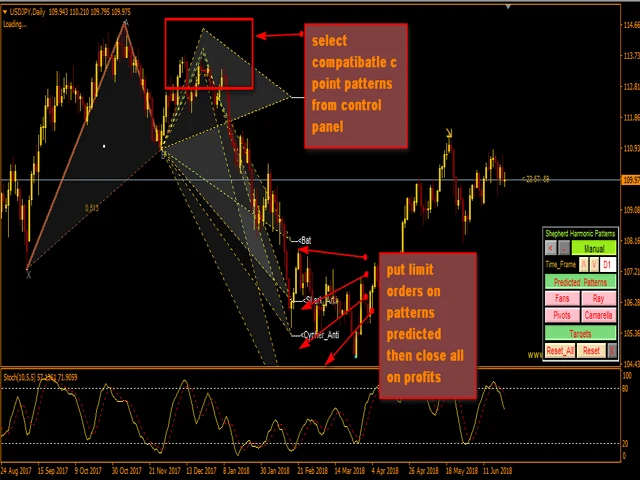
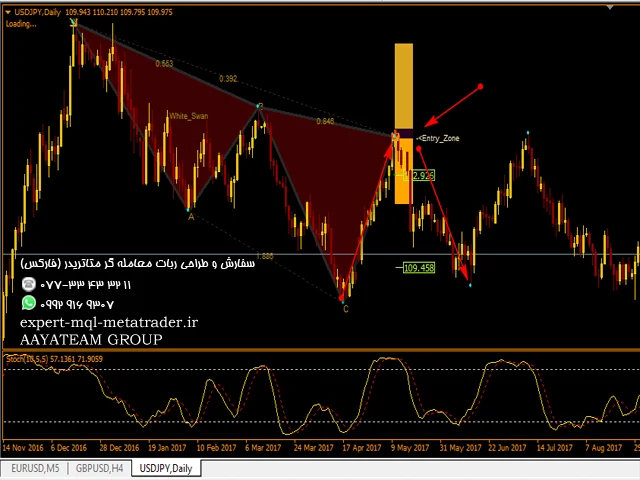
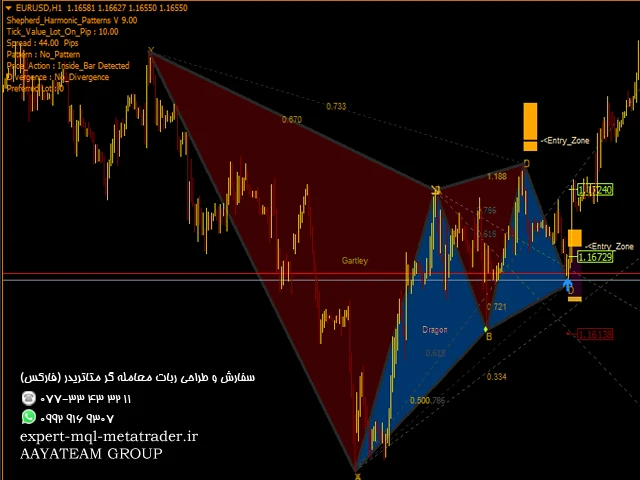
این شاخص الگوهای هارمونیکی را که با استفاده از روش دستی و اتوماتیک روی نمودار ترسیم شده اند ، تشخیص میدهد. کتابچه راهنمای کاربر را میتوانید از این لینک مشاهده کنید:
https://www.mql5.com/fa/blogs/post/719257
یک نسخه رایگان برای امتحان این محصول وجود دارد. میتوانید از آن برای تشخیص الگوهای Gartley و Nenstar استفاده کنید:
https://www.mql5.com/fa/market/product/30181
یادداشت
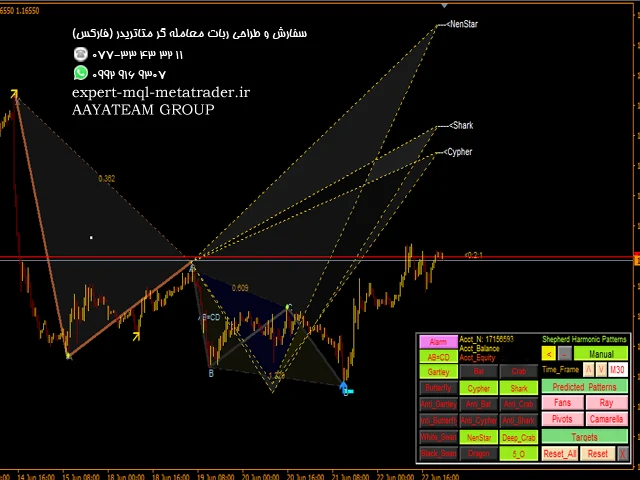
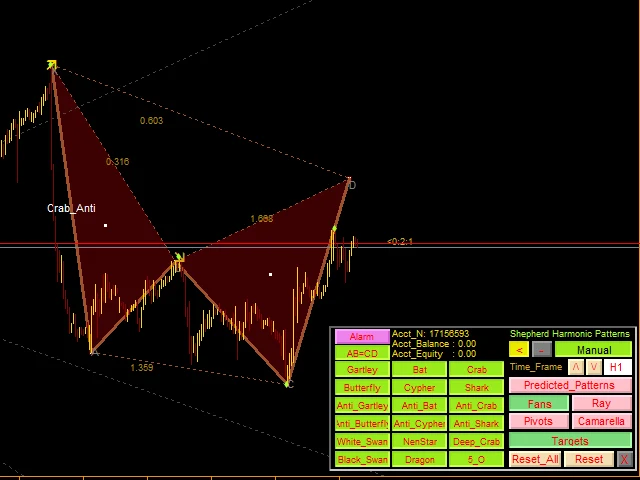
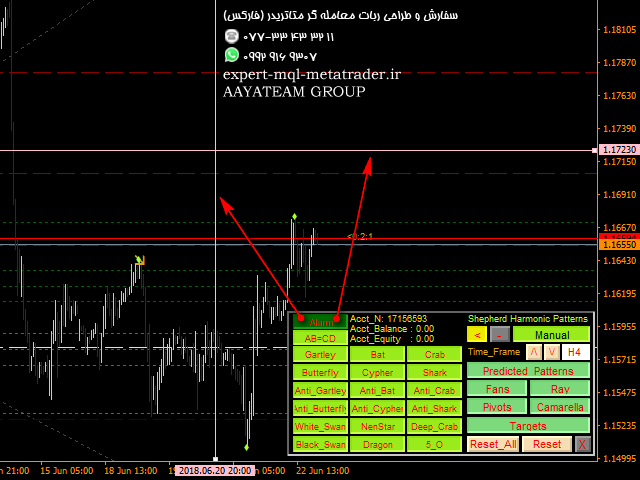
شاخص دارای صفحه کنترل است و در هر (نمودار و بازه زمانی) تنظیمات ذخیره میشود. برای داشتن فضای بیشتر روی نمودار میتوانید آن را به حداقل برسانید و اگر ترجیح میدهید در آن لحظه با سایر ابزارهای تجزیه و تحلیل کار کنید ، میتوانید دکمه بستن را فشار دهید تا تمام داده های شاخص روی نمودار پنهان شود.
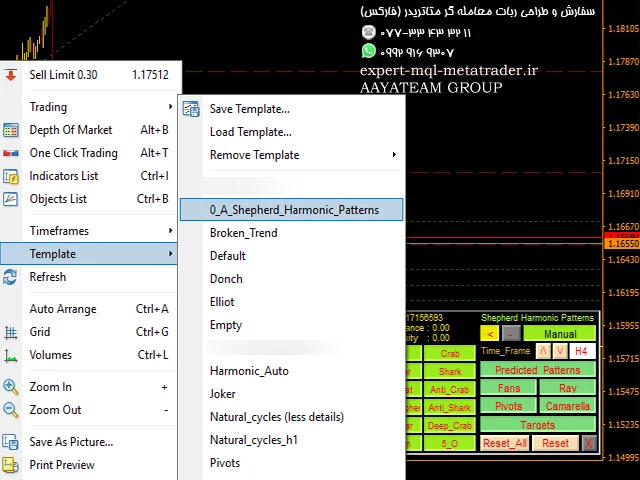
هنگامی که از این نشانگر استفاده میکنید و تنظیمات را تغییر میدهید ، شاخص هایی مانند Moving Average یا Bollinger Bands را اضافه میکنید ، این شاخص الگوهای ویرایش شما را به صورت خودکار ذخیره میکند و میتوانید هر زمان که خواستید آنها را بارگیری کنید.
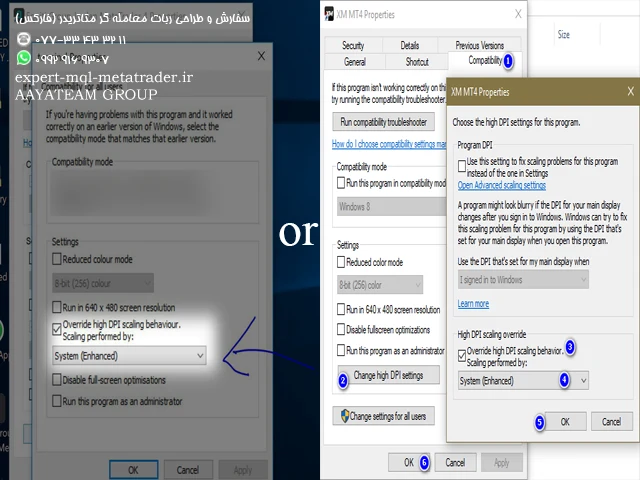
اگر از ویندوز 10 استفاده میکنید ، بر روی نماد MetaTrader> سازگاری> تغییر تنظیمات High DPI> سیستم (پیشرفته) کلیک راست کنید تا بهترین تنظیمات صفحه را داشته باشید (این کار باید در دستگاه های HD انجام شود).
شاخص به سادگی تفسیری از تئوری تجارت هارمونیک برای تشخیص الگوهای هارمونیک در نمودار است. اگر میخواهید آن را یاد بگیرید میتوانید کتاب اسکات کارنی به نام “Harmonic Trading vol 1 & 2” را جستجو کنید.
شاخص دارای خطوط هشدار قیمت و زمان است.
شاخص فن های فیبوناچی را بر روی الگوهای شناسایی شده شما ترسیم میکند.
شاخص Pivots / Camarella / Patterns Ray را ترسیم میکند.
میتوانید اشیا drawn رسم شده دستی را از بازه های زمانی بالاتر در بازه های زمانی پایین بارگذاری کنید.
با دکمه های بازنشانی ، تمام تنظیمات ذخیره شده (همه / فعلی) بازه زمانی پاک میشوند.
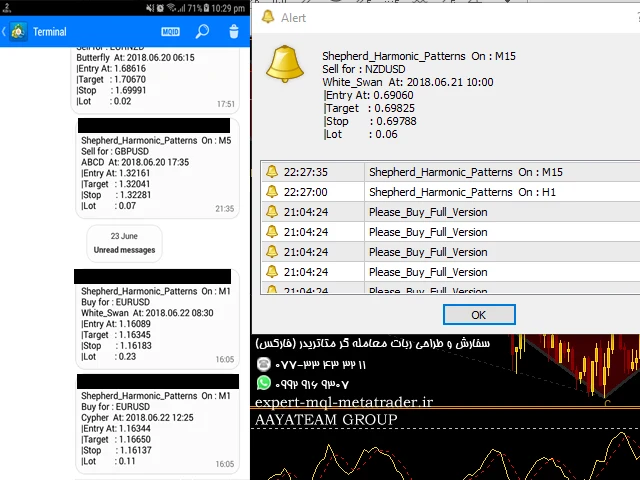
شاخص دارای یک سیستم هشدار / اعلان است که اهداف / توقف / نقاط ورود را به عنوان سیگنال در اختیار شما قرار میدهد.
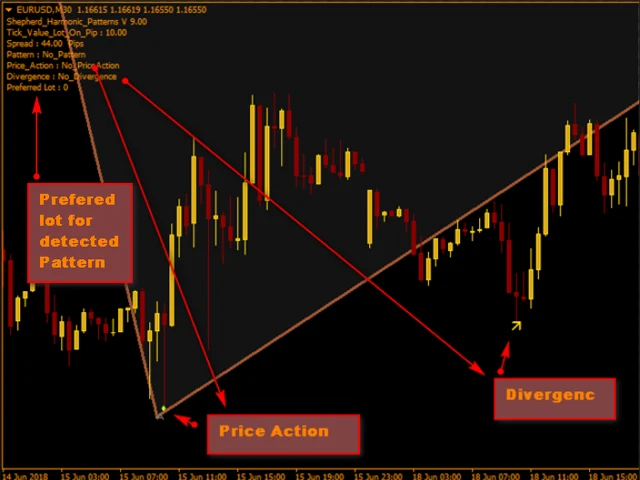
شاخص واگرایی (فلش های زرد و نارنجی) را تشخیص میدهد و آنها تأییدهای خوبی هستند.
شاخص بهترین اندازه لات را برای هر الگو محاسبه میکند زیرا برای تعادل شما با مقدار ریسک هنگام وارد کردن در تنظیمات مناسب است.
شاخص همچنین الگوهای اقدام قیمت (Pinbar ، InsideBar ، OutSideBar) را تشخیص میدهد.
با استفاده از این کد میتوانید از بافرهای این نشانگر در EA استفاده کنید:
Double buy_signal = iCustom (NULL ، 0 ، “Market \\ Shepherd_Harmonic_Pternterns”، 0،1)؛ // if (buy_signal! = EMPTY_VALUE) {// buy}
Double sell_signal = iCustom (NULL ، 0 ، “Market \\ Shepherd_Harmonic_Parnterns”، 1،1)؛ // if (buy_signal! = EMPTY_VALUE) {// فروش}
Double Bull_divergence = iCustom (NULL ، 0 ، “Market \\ Shepherd_Harmonic_Patterns”، 2،1)؛ // if (گاو_ واگرایی! = EMPTY_VALUE) {// خرید}
Double_Divergence = iCustom (NULL ، 0 ، “Market \\ Shepherd_Harmonic_Patterns”، 3،1)؛ // if (خرس_ واگرایی! = EMPTY_VALUE) {// فروش}
Double sl_Value = iCustom (NULL ، 0 ، “Market \\ Shepherd_Harmonic_Patterns”، 4،1)؛
double tp1_Value = iCustom (NULL ، 0 ، “Market \\ Shepherd_Harmonic_Patterns”، 5،1)؛
Double tp2_Value = iCustom (NULL ، 0 ، “Market \\ Shepherd_Harmonic_Patterns”، 6،1)؛
Double tp3_Value = iCustom (NULL ، 0 ، “Market \\ Shepherd_Harmonic_Patterns”، 7،1)؛
Double_ Price_Action = iCustom (NULL ، 0 ، “Market \\ Shepherd_Harmonic_Patterns”، 8،1)؛ if (Price_Action! = EMPTY_VALUE) {// trade = true؛}
مولفه های
Use_System_Visuals – فعال کردن \ غیرفعال کردن موضوع نشانگر.
Show_Last_Candle_Counter – فعال کردن / غیر فعال کردن تایمر شمع.
شمع_شمار_رنگ – رنگ تایمر شمع.
Accuracy_Percent – درصد دقت الگوها نسبت.
Colour_Pattern_Color – رنگ برای الگوهای صعودی.
Bearish_Pattern_Color – رنگ برای الگوهای نزولی.
ABCD_Color – AB = رنگ الگوهای CD.
رنگ_الگوی_ دستی – رنگ الگوی دستی.
Show_Proportions – فعال کردن \ غیر فعال کردن نمای تناسب الگوها.
Show_PRZ – فعال کردن / غیرفعال کردن نمایش مناطق احتمالی معکوس.
Targets_Only_Completed_D – فعال کردن \ غیرفعال کردن اهداف نمایش فقط در الگوهای تکمیل شده.
Font_Color – رنگ متن ها.
Fan_Color – رنگ طرفداران.
Send_Alert – فعال کردن \ غیرفعال کردن عملکرد هشدار.
Send_Notification – فعال کردن گزینه غیرفعال کردن اعلان.
Send_Email – فعال کردن \ غیرفعال کردن عملکرد ایمیل.
InsideBar_Sensor – فعال کردن / غیرفعال کردن تشخیص عملکرد InsideBar.
OutSideBar_Sensor – فعال کردن / غیرفعال کردن تشخیص عملکرد OutSideBar.
PinBar_Sensor – فعال کردن فعال کردن غیرفعال کردن عملکرد قیمت PinBar.
Risk_Percent – درصد ریسک برای محاسبه با الگوهای متوقف کردن ضرر و تراز حساب.
History_Bars – حداکثر میله هایی که در محاسبات استفاده میشود.
Shepherd Harmonic Pattern
This indicator will detect harmonic patterns that are drawn on the chart by manual and automatic methods. You can see user manual from this link:
https://www.mql5.com/en/blogs/post/719257
There is a free version to try this product. You can use it to detect Gartley and Nenstar patterns:
https://www.mql5.com/en/market/product/30181
Notes
- Indicator has control panel and it will save every (chart & timeframe) settings. You can minimize it to have more space on chart and you can press close button to hide all indicator data on chart if you prefer to work with other analysis tools at that moment.
- When you use this indicator and change the settings, add indicators like Moving Average or Bollinger Bands, this indicator will save template of you edits automatically and you can load them any time you need.
- If you are using Windows 10, press right click on MetaTrader icon > Compatibility > Change High DPI Settings > System (Enhanced) to have best screen settings (it should be done in HD Devices).
- Indicator is simply an interpretation of harmonic trading theory for detecting harmonic patterns on the chart. If you want to learn it you can search for Scott Carney’s book named “Harmonic Trading vol 1&2”.
- Indicator has price and time alert lines.
- Indicator will draw Fibonacci fans on your detected patterns.
- Indicator will draw Pivots/Camarella/Patterns Ray.
- You can load manually drawn objects from higher timeframes into lower timeframes.
- Reset buttons will clear all saved settings (All / Current) timeframe.
- Indicator has an alert / notification system that will provide you with targets/stop/entry points as signal.
- Indicator will detect divergence (yellow and orange arrows) and they serve as good confirmations.
- Indicator will calculate best lot size for every pattern as it is good for your balance with risk value as you insert in settings.
- Indicator will detect also price action patterns (Pinbar,InsideBar,OutSideBar).
- You can use this indicator buffers in an EA using this code:
double buy_signal=iCustom(NULL,0,"Market\\Shepherd_Harmonic_Patterns",0,1); //if(buy_signal!= EMPTY_VALUE){//buy}
double sell_signal=iCustom(NULL,0,"Market\\Shepherd_Harmonic_Patterns",1,1); //if(buy_signal!=EMPTY_VALUE){//sell}
double bull_divergence=iCustom(NULL,0,"Market\\Shepherd_Harmonic_Patterns",2,1); //if(bull_divergence!=EMPTY_VALUE){//buy}
double bear_divergence=iCustom(NULL,0,"Market\\Shepherd_Harmonic_Patterns",3,1); //if(bear_divergence!=EMPTY_VALUE){//sell}
double sl_Value=iCustom(NULL,0,"Market\\Shepherd_Harmonic_Patterns",4,1);
double tp1_Value=iCustom(NULL,0,"Market\\Shepherd_Harmonic_Patterns",5,1);
double tp2_Value=iCustom(NULL,0,"Market\\Shepherd_Harmonic_Patterns",6,1);
double tp3_Value=iCustom(NULL,0,"Market\\Shepherd_Harmonic_Patterns",7,1);
double Price_Action=iCustom(NULL,0,"Market\\Shepherd_Harmonic_Patterns",8,1);if(Price_Action!=EMPTY_VALUE){//trade=true;}
Parameters
- Use_System_Visuals – Enable\Disable indicator theme.
- Show_Last_Candle_Counter – Enable\Disable candle timer.
- Candle_Counter_Color – Color of candle timer.
- Accuracy_Percent – Percent for patterns proportions accuracy.
- Bullish_Pattern_Color – Color for bullish patterns.
- Bearish_Pattern_Color – Color for bearish patterns.
- ABCD_Color – AB=CD patterns color.
- Manual_Pattern_Color – Color of manual pattern.
- Show_Proportions – Enable\Disable patterns proportions view.
- Show_PRZ – Enable\Disable potential reversal zones view.
- Targets_Only_Completed_D – Enable\Disable show targets only on completed patterns.
- Font_Color – Color of texts.
- Fan_Color – Color of fans.
- Send_Alert – Enable\Disable alert function.
- Send_Notification – Enable\Disable notification function.
- Send_Email – Enable\Disable email function.
- InsideBar_Sensor – Enable\Disable InsideBar price action detecting.
- OutSideBar_Sensor – Enable\Disable OutSideBar price action detecting.
- PinBar_Sensor – Enable\Disable PinBar price action detecting.
- Risk_Percent – Risk percent to calculate with patterns stop loss value and account balance.
- History_Bars – Max bars that will be used in calculations.
تماس و واتس آپ اکسپرت سفارشی: ۰۷۷۳۳۴۳۳۲۱۱ – ۰۹۹۲۹۱۶۹۳۰۷